How my home server hosts eight websites with no open ports
This post walks through the security setup behind my homelab one layer at a time. A cloud VM at the edge terminates TLS and blocks banned IPs, and an encrypted mesh carries traffic back to the house. An IDS detects on the home server and enforces at the edge, and a SIEM watches both hosts from the inside.
My home server hosts eight public websites. I did not have to expose any of my home network to do that. Nexus, the server, sits behind my home router with no public IP and no forwarded ports. You cannot reach it from the internet.
An earlier post covered the hardware and what runs on it. This one covers the part I care about more: how traffic gets in, where it gets inspected, and what is watching for anything that slips through.
The layout
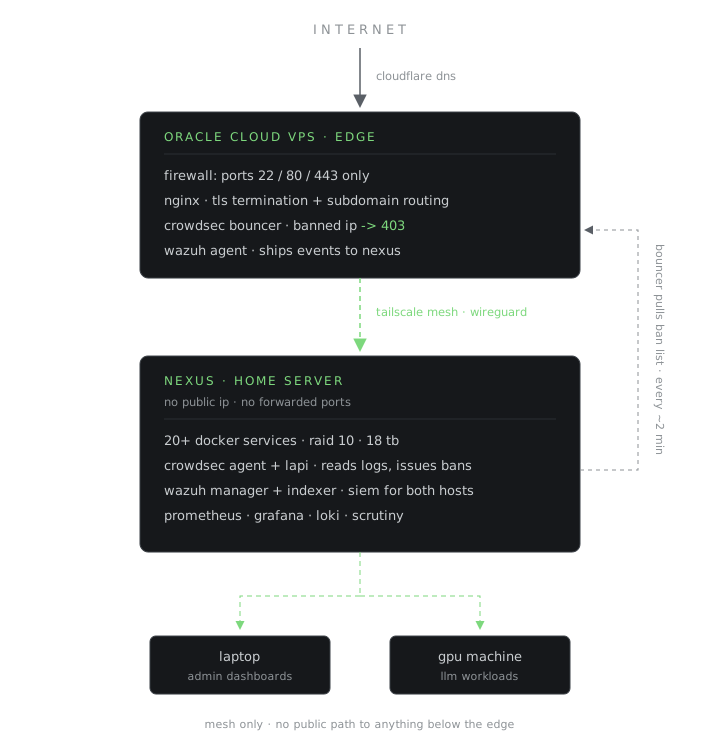
Every request hits a small cloud VM first, gets filtered there, and travels the rest of the way over an encrypted private network. Detection runs on the home server and enforcement happens at the edge. A separate system watches both machines from the inside. The rest of this post walks through each layer.
The edge is a free cloud VM
The only machine with a public IP address is a free-tier Oracle Cloud VM. Its firewall allows only three ports: 22 for SSH (key authentication only), 80 for HTTP (which only redirects to HTTPS), and 443 for HTTPS. Everything else is rejected before any application sees it.
Nginx on this VM terminates TLS (meaning it holds the certificates and decrypts incoming HTTPS) and routes each subdomain to the matching service on Nexus. Before it forwards anything, the CrowdSec bouncer checks the source IP against a ban list. If the IP is banned, Nginx returns a 403 and the request ends there. It never enters the tunnel and never gets anywhere near my house.
The reason for this design is blast radius. The VM holds no data. If it were ever compromised, I would tear it down and rebuild it from a documented config in an afternoon. Compare that with port-forwarding from my home router, where the machine answering internet traffic is the same machine holding 18 TB of personal data, sitting on the same network as every other device I own.
The tunnel
Traffic between the VPS and Nexus travels over Tailscale, a mesh VPN built on WireGuard. Each machine authenticates to the mesh and gets a stable private address that works regardless of where the machine physically is. Connections are established outbound from each node, which is why Nexus needs no forwarded ports.
The mesh also carries everything that should never be public. My laptop reaches the server’s admin dashboards over it, and the GPU machine that runs LLM workloads for my job-search pipeline is reachable only inside it. If a service has no reason to face the internet, it is not routed through the edge, and there is no public path to it at all.
CrowdSec detects at home and blocks at the edge
CrowdSec is an intrusion detection and prevention system with a design that fits this split-machine setup unusually well, because its detector and its blocker are separate components.
The agent runs on Nexus and reads service logs, applying detection rules called scenarios. Scenarios work on a leaky bucket model: events drip into a bucket, and if enough arrive within a time window, the bucket overflows and a decision is created, such as "ban this IP for four hours." An IP requesting ten nonexistent paths in a minute is scanning. Five failed SSH logins in two minutes is brute force. A request path matching a known CVE exploit pattern is banned immediately.
Decisions land in a local API on Nexus, and the bouncer on the VPS pulls that list every couple of minutes and enforces it in Nginx. The local API is reachable only inside the mesh. The agent runs on Nexus because that is where the service logs are, and the bouncer runs on the VPS because that is where traffic enters.
The part that surprised me is the community blocklist. CrowdSec nodes worldwide share the IPs they ban, so a large share of the IPs my edge rejects were flagged by someone else’s server before they ever sent me a packet. In the first 90 days the edge blocked over 100 intrusion attempts, most of them bots hammering login pages. I wrote in the previous post about the one false positive worth knowing: my own uptime monitor got banned because polling your services every minute looks like a scanner. The fix is a whitelist that skips detection for that source entirely, since manually unbanning just lets it get banned again on the next check.
Wazuh watches the hosts from the inside
CrowdSec sees traffic patterns, but it cannot tell me whether an attack worked. That is the job of Wazuh, an open-source SIEM (security information and event management platform, the same category of software a corporate security operations center runs).
Agents on both Nexus and the VPS ship events to a manager running on Nexus. Every log line passes through a decoder, which extracts structured fields like source IP and username, then through rules that assign a severity from 1 to 15. Everything gets stored in OpenSearch, so I can search weeks of events across both machines from one dashboard.
Two of its capabilities do most of the work here. File integrity monitoring hashes every file in sensitive directories like /etc and /usr/bin and alerts on any change, which is how you catch a modified binary or a dropped webshell that no network tool would ever see. And every alert is mapped to the MITRE ATT&CK framework, a catalogue of known attacker techniques, so instead of a wall of log noise I get "this looks like T1110, brute force" and a heatmap of which techniques my infrastructure has seen.
The two systems overlap on purpose. CrowdSec answers "should this IP be blocked," and Wazuh answers "what happened on the host." A failed SSH login on the VPS shows up in both: CrowdSec counts it toward a ban, and Wazuh records who, from where, against which account, with the full raw log line attached.
What is still missing
Wazuh has an active response feature that can block IPs automatically when a rule fires, and I have left it off so far. Two systems auto-banning independently is how you lock yourself out, so I want to think through the interaction before enabling it.
The edge VM is a single point of failure. If it goes down, all eight sites go down. For a homelab I can accept that; the fix would be a second VM and DNS failover.
Alert review is the weak spot. Blocking is automatic, but Wazuh alerts only get seen when I open the dashboard. Wiring high-severity alerts into the Telegram notifications I already use for uptime is next on the list, because a SIEM that nobody reads works only as a log archive.
None of these tools are unusual. The setup lets me run the full loop on infrastructure that faces real attackers, and every rule that fires is mine to investigate and explain.